
개요
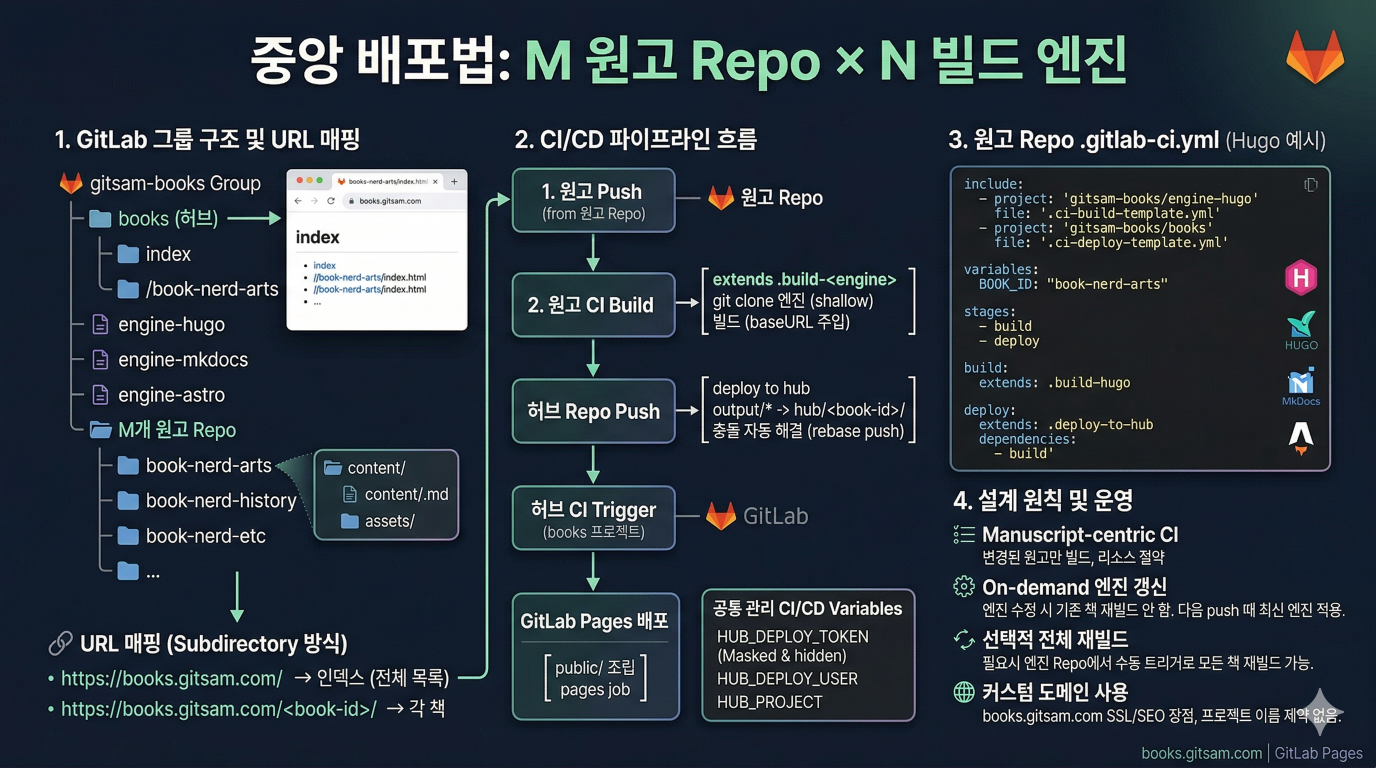
M개의 원고 Repo와 N개의 빌드 엔진을 조합하여 books.gitsam.com 단일 도메인으로 배포.
설계 원칙:
- Manuscript-centric CI: 각 원고 Repo가 자신의 CI에서 엔진을 가져와 빌드하고, 결과물을 허브로 전송한다. M개 원고 중 변경된 것만 빌드하므로 CI 리소스를 절약한다.
- 엔진 모듈화: Hugo, MkDocs, Astro, quartz 등을 독립 프로젝트로 분리한다. 원고 Repo는 Markdown 콘텐츠에만 집중한다.
- On-demand 엔진 갱신: 엔진 수정 시 기존 빌드를 자동 재빌드하지 않는다. 각 원고가 다음 빌드 시 최신 엔진을 자연스럽게 가져간다.
- 중앙 집중 배포: 모든 결과물은 허브 Repo 루트로 수렴하고, CI가
public/을 조립하여 GitLab Pages 단일 사이트로 배포한다.
원고 Repo 파일 구조
각 원고 Repo는 아래 구조를 따른다. Markdown 파일은 content/에, 각 파일이 사용하는 이미지 등 에셋은 content/<파일명>/에 배치한다.
book-nerd-arts/                        ← 원고 Repo
├── .gitlab-ci.yml                     ← CI 설정 (BOOK_ID만 다름)
└── content/
    ├── 1.md
    ├── 1/
    │   └── 1-image.jpg
    ├── 2.md
    ├── 2/
    │   ├── 2-diagram.png
    │   └── 2-photo.jpg
    └── ...
content/<n>.md 파일 안에서 이미지를 참조할 때는 상대 경로를 사용한다:
엔진 관련 파일(테마, 설정 등)은 원고 Repo에 두지 않는다. CI가 엔진 Repo를 clone하여 빌드한다.
단계별 절차
include:
  - project: 'gitsam-books/engine-hugo'
    file: '.ci-build-template.yml'
  - project: 'gitsam-books/books'
    file: '.ci-deploy-template.yml'

variables:
  BOOK_ID: "<book-id>"  # ← 여기만 변경

stages:
  - build
  - deploy

build:
  extends: .build-hugo

deploy:
  extends: .deploy-to-hub
  dependencies:
    - build
GitLab Group 구조
1 Group과 프로젝트 배치
gitsam-books/                               ← GitLab Group
├── books/                                 ← 허브 (기존 Repo, Pages 배포 전용)
├── engine-hugo/                           ← Hugo 빌드 엔진
├── engine-mkdocs/                         ← MkDocs 빌드 엔진
├── engine-astro/                          ← Astro 빌드 엔진
├── book-nerd-arts/                        ← 원고 Repo
├── book-nerd-history/                     ← 원고 Repo
├── book-ict-interface/                    ← 원고 Repo
└── ... ← 총 M개 원고 Repogitsam-books.gitlab.io)에서는 프로젝트 이름이 <group-name>.gitlab.io여야 루트(/)에 서빙된다. 하지만 커스텀 도메인(books.gitsam.com)을 사용하면 이 제약이 없다. 커스텀 도메인은 특정 프로젝트의 Pages에 직접 연결되므로, 기존 books 프로젝트를 그대로 허브로 사용할 수 있다.2 URL 매핑 (Subdirectory 방식)
books.gitsam.com 하위에 각 책을 서브디렉터리로 배치한다.
https://books.gitsam.com/→ 인덱스 페이지 (전체 목록)https://books.gitsam.com/book-nerd-arts/→ book-nerd-artshttps://books.gitsam.com/book-nerd-history/→ book-nerd-historyhttps://books.gitsam.com/book-ict-interface/→ book-ict-interface
Subdirectory 방식의 장점:
- SEO: 단일 도메인 아래 모든 콘텐츠가 묶여 검색 엔진 최적화에 유리하다.
- SSL: 커스텀 도메인 하나에 Let's Encrypt 인증서 하나로 해결된다.
- Cross-linking: 상대 경로(
../)로 책 간 이동이 가능하다.
3 최종 배포 디렉터리 구조
허브 Repo 루트의 콘텐츠가 CI를 통해 public/로 조립되어 books.gitsam.com에 매핑된다.
books/                                ← 허브 Repo 루트
├── .gitlab-ci.yml                         ← Pages 배포 job
├── .ci-deploy-template.yml                ← 원고 CI에서 include하는 배포 템플릿
├── index.html                        ← books.gitsam.com 메인
├── book-nerd-arts/
│   └── index.html                    ← books.gitsam.com/book-nerd-arts/
├── book-nerd-history/
│   └── index.html
└── book-ict-interface/
    └── index.html
4 Group 수준 공통 관리
Group Settings → CI/CD → Variables에 다음을 등록한다.
| 변수명 | 값 | 용도 |
|---|---|---|
HUB_DEPLOY_TOKEN | 허브 Repo의 Deploy Token | 허브 Repo 쓰기 접근 (write_repository scope) |
HUB_DEPLOY_USER | Deploy Token 생성 시 발급되는 username | Deploy Token 인증용 (gitlab+deploy-token-XXXXX 형태) |
HUB_PROJECT | gitsam-books/books | 허브 Repo 경로 (deploy 스크립트에서 사용) |
이 변수들은 Group 하위 모든 프로젝트의 CI에서 공통으로 사용된다.
gitsam-books Group CI/CD Variables에 3개 변수를 각각 추가하면 됩니다. 변수마다 "Add variable" 버튼을 눌러 하나씩 등록해야 합니다.
- Protect variable은 체크하지 마세요 — 체크하면 protected branch/tag에서만 사용 가능해서, 일반
main브랜치 파이프라인에서 변수를 못 읽을 수 있습니다 (단,main을 protected branch로 설정해둔 경우는 체크해도 괜찮습니다). - Expand variable reference도 체크하지 마세요 — 토큰 값에
문자가 포함되어 있으면 다른 변수 참조로 해석되어 깨질 수 있습니다. HUB_DEPLOY_TOKEN은 민감 정보이므로 반드시 Masked and hidden으로 설정하세요. 이렇게 하면 job 로그에도 노출되지 않고, 저장 후 UI에서도 다시 볼 수 없습니다.
1️⃣ HUB_DEPLOY_TOKEN
| 필드 | 값 |
|---|---|
| Type | Variable |
| Visibility | Masked and hidden ← 토큰이므로 반드시 이것 선택 |
| Flags | 둘 다 체크 해제 (Protect ✗, Expand ✗) |
| Description | books Repo Deploy Token (write_repository) |
| Key | HUB_DEPLOY_TOKEN |
| Value | Deploy Token 생성 시 발급된 토큰 문자열 (한 번만 보여주므로 복사해둔 값) |
2️⃣ HUB_DEPLOY_USER
| 필드 | 값 |
|---|---|
| Type | Variable |
| Visibility | Visible ← username은 민감하지 않으므로 Visible로 충분 |
| Flags | 둘 다 체크 해제 (Protect ✗, Expand ✗) |
| Description | books deploy token username |
| Key | HUB_DEPLOY_USER |
| Value | Deploy Token 생성 시 자동 발급된 username (예: gitlab+deploy-token-12345) |
3️⃣ HUB_PROJECT
| 필드 | 값 |
|---|---|
| Type | Variable |
| Visibility | Visible |
| Flags | 둘 다 체크 해제 (Protect ✗, Expand ✗) |
| Description | books deploy repo |
| Key | HUB_PROJECT |
| Value | gitsam-books/books |
CI/CD 파이프라인
1 전체 흐름
빌드 주체가 허브가 아닌 각 원고 Repo에 있다. 변경된 원고만 빌드하고, 허브는 배포만 담당한다.
git clone --depth 1을 사용한다. Submodule은 커밋 해시 고정, 재귀 초기화 등 불필요한 복잡도를 추가한다. CI_JOB_TOKEN으로 같은 Group 내 프로젝트를 인증 없이 clone할 수 있으므로 shallow clone이 가장 단순하다.2 CI 템플릿 (DRY 설정)
M개의 원고 Repo가 거의 동일한 CI 설정을 갖는다. GitLab의 include:project를 활용하여 공통 로직을 템플릿으로 추출한다.
Hugo 빌드 템플릿 — 엔진 Repo에 배치 (engine-hugo/.ci-build-template.yml):
.build-hugo:
  variables:
    GROUP_URL: "${CI_SERVER_PROTOCOL}://gitlab-ci-token:${CI_JOB_TOKEN}@${CI_SERVER_HOST}/${CI_PROJECT_NAMESPACE}"
  stage: build
  image: hugomods/hugo:exts
  script:
    - git clone --depth 1 ${GROUP_URL}/engine-hugo.git engine
    - cd engine
    - hugo --config "config/_default/hugo.toml,config/books/${BOOK_ID}.toml"
           --destination ../output
  artifacts:
    paths:
      - output
MkDocs 빌드 템플릿 (engine-mkdocs/.ci-build-template.yml):
.build-mkdocs:
  variables:
    GROUP_URL: "${CI_SERVER_PROTOCOL}://gitlab-ci-token:${CI_JOB_TOKEN}@${CI_SERVER_HOST}/${CI_PROJECT_NAMESPACE}"
  stage: build
  image: squidfunk/mkdocs-material:latest
  script:
    - git clone --depth 1 ${GROUP_URL}/engine-mkdocs.git engine
    - cd engine
    - pip install -r requirements.txt
    - BOOK=${BOOK_ID} mkdocs build --site-dir ../output
  artifacts:
    paths:
      - output
Astro 빌드 템플릿 — 엔진 Repo에 배치 (engine-astro/.ci-build-template.yml):
.build-astro:
  variables:
    GROUP_URL: "${CI_SERVER_PROTOCOL}://gitlab-ci-token:${CI_JOB_TOKEN}@${CI_SERVER_HOST}/${CI_PROJECT_NAMESPACE}"
  stage: build
  image: node:22-alpine
  script:
    - git clone --depth 1 ${GROUP_URL}/engine-astro.git engine
    - cd engine
    - npm ci
    - cp -r ${CI_PROJECT_DIR}/content src/content/${BOOK_ID}
    - ASTRO_BASE="/${BOOK_ID}/" npm run build
    - mv dist ../output
  artifacts:
    paths:
      - output
배포 템플릿 — 허브 Repo에 배치 (books/.ci-deploy-template.yml):
.deploy-to-hub:
  stage: deploy
  image: alpine:latest
  script:
    - apk add --no-cache git
    - git clone --depth 1
          https://${HUB_DEPLOY_USER}:${HUB_DEPLOY_TOKEN}@${CI_SERVER_HOST}/${HUB_PROJECT}.git hub
    - rm -rf hub/${BOOK_ID}
    - mkdir -p hub/${BOOK_ID}
    - cp -r output/* hub/${BOOK_ID}/
    - cd hub
    - git config user.email "ci@books.gitsam.com"
    - git config user.name "CI Deploy"
    - git add -A
    - 'git diff --cached --quiet || git commit -m "deploy: ${BOOK_ID}"'
    - git push || (git pull --rebase origin main && git push)
  only:
    - main
마지막 줄의 git push || (git pull --rebase ...) 는 두 원고가 동시에 허브에 push할 때의 충돌을 자동으로 해결한다.
3 원고 Repo CI (최종 형태)
템플릿을 사용하면 각 원고 Repo의 .gitlab-ci.yml은 BOOK_ID 한 줄만 다르다.
Hugo 원고 예시 (book-nerd-arts/.gitlab-ci.yml):
include:
  - project: 'gitsam-books/engine-hugo'
    file: '.ci-build-template.yml'
  - project: 'gitsam-books/books'
    file: '.ci-deploy-template.yml'

variables:
  BOOK_ID: "book-nerd-arts"

stages:
  - build
  - deploy

build:
  extends: .build-hugo

deploy:
  extends: .deploy-to-hub
  dependencies:
    - build
MkDocs 원고 예시 (book-ict-interface/.gitlab-ci.yml):
include:
  - project: 'gitsam-books/engine-mkdocs'
    file: '.ci-build-template.yml'
  - project: 'gitsam-books/books'
    file: '.ci-deploy-template.yml'

variables:
  BOOK_ID: "book-ict-interface"

stages:
  - build
  - deploy

build:
  extends: .build-mkdocs

deploy:
  extends: .deploy-to-hub
  dependencies:
    - build
엔진을 바꾸고 싶으면 include의 엔진 프로젝트와 extends 대상만 교체하면 된다.
Astro 원고 예시 (book-nerd-history/.gitlab-ci.yml):
include:
  - project: 'gitsam-books/engine-astro'
    file: '.ci-build-template.yml'
  - project: 'gitsam-books/books'
    file: '.ci-deploy-template.yml'

variables:
  BOOK_ID: "book-nerd-history"

stages:
  - build
  - deploy

build:
  extends: .build-astro

deploy:
  extends: .deploy-to-hub
  dependencies:
    - build
4 허브 Repo CI
허브 Repo는 배포만 담당한다. books/.gitlab-ci.yml:
pages:
  stage: deploy
  script:
    - mkdir -p public
    - cp index.html public/
    - for dir in book-*/; do cp -r "$dir" public/; done
  artifacts:
    paths:
      - public
  only:
    - main
원고 CI가 빌드 결과물을 허브 Repo 루트에 push하면, 허브 CI가 이를 public/로 조립하여 GitLab Pages로 배포한다.
엔진 변경 시 처리
1 기본 전략: On-demand Fetch
엔진 Repo 수정 시 기존 책들을 즉시 재빌드하지 않는다. 각 원고가 다음 push 때 git clone --depth 1로 최신 엔진을 자연스럽게 가져간다.
이 방식의 전제: 엔진의 하위 호환성을 유지한다. Breaking change가 있을 때만 선택적으로 전체 재빌드를 실행한다.
2 선택적 전체 재빌드
테마 대규모 변경 등 전체 적용이 필요한 경우, 엔진 Repo에 수동 트리거 job을 둔다.
engine-hugo/.gitlab-ci.yml:
rebuild-all:
  stage: trigger
  variables:
    BOOKS: "book-nerd-arts book-nerd-history book-ict-interface"
  script:
    - |
      for BOOK in ${BOOKS}; do
        curl --request POST \
          --header "PRIVATE-TOKEN: ${TRIGGER_TOKEN}" \
          "https://gitlab.com/api/v4/projects/${CI_PROJECT_NAMESPACE}%2F${BOOK}/pipeline" \
          --form "ref=main"
      done
  when: manual
  only:
    - main
when: manual이므로 CI 화면에서 버튼을 눌러야만 실행된다. 일상적인 엔진 커밋에서는 실행되지 않는다.
커스텀 도메인 설정
- 허브 Repo(
books) → Deploy > Pages에서books.gitsam.com을 커스텀 도메인으로 등록한다. - DNS CNAME 레코드를 추가한다:
books.gitsam.com→gitsam-books.gitlab.io(Group Pages 도메인) - GitLab이 Let's Encrypt 인증서를 자동 발급한다. Pages 설정 > Force HTTPS를 활성화한다.
- 검증이 완료되면
https://books.gitsam.com/으로 접근 가능하다.
1 baseURL 규칙
모든 엔진에서 책의 baseURL은 다음을 따른다.
- 형식:
https://books.gitsam.com/<book-id>/ book-id는 원고 Repo 이름과 동일하게 고정한다.- Hugo:
config/books/<book-id>.toml의baseURL필드 - MkDocs:
mkdocs.yml의site_url또는 환경변수 주입 - Astro: 환경변수
ASTRO_BASE="/<book-id>/"주입 (빌드 템플릿에서 자동 처리)